Como criar uma visualização 3D dinâmica no meu projeto?
Por Athos Alves de Souza
Você sabia que o Preview 3D Dinâmico permite criar uma visualização real da montagem do SOLIDWORKS na interface do DriveWorks?
Sendo uma interface criada para customização de projetos nos módulos User, Administrator e Live, ou seja, pode rodar até em ambiente web em qualquer navegador, Google Chrome, Firefox e Edge.
Neste artigo vamos adicionar um 3DPreview em uma montagem do SOLIDWORKS configurada.
Para realizar os procedimentos, é necessário validar alguns requisitos antes, como por exemplo:
- Conhecimento de desenvolvimento de projetos no DriveWorks Pro
- Módulos do DriveWorks:
- DriveWorks Administrator
- DriveWorks Autopilot
Passo a passo
1 – No DriveWorks Administrator, crie um novo projeto ou use um projeto existente.
2 – Adicione um controlador 3D Preview Box no Form Design.
3 – É preciso criar um avento para atualização da visualização do item 3D, então para isso, devemos adicionar um Macro Button.
4 – Acesse o DriveWorks Autopilot e marque a opção Enable 3D Preview em Settings.
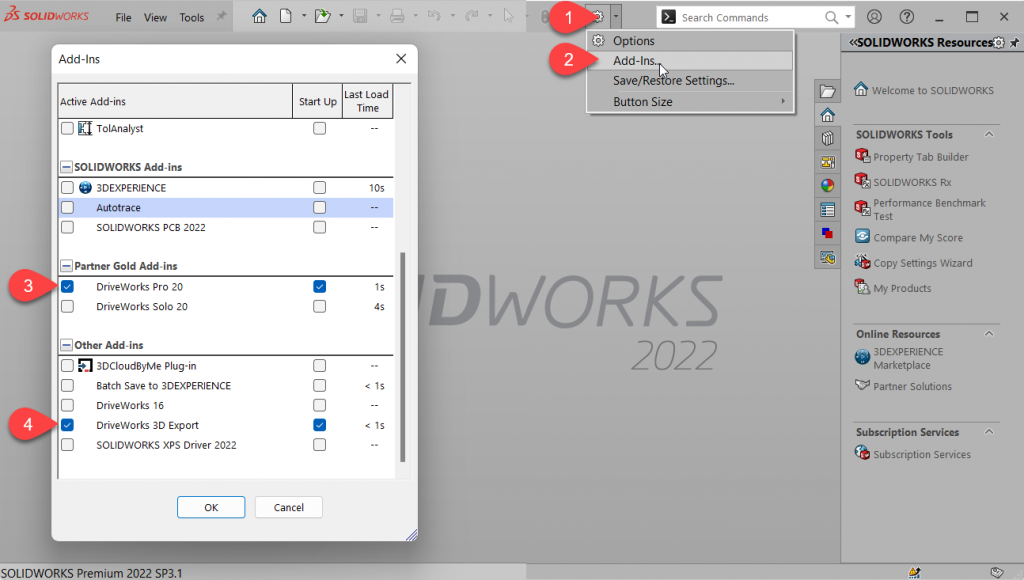
5 -O Autopilot usa o SOLIDWORKS para gerar os componentes e os arquivos de visualização 3D, verifique se no SOLIDWORKS os Add-ins DriveWorks Pro e DriveWorks 3D Export estão habilitados.
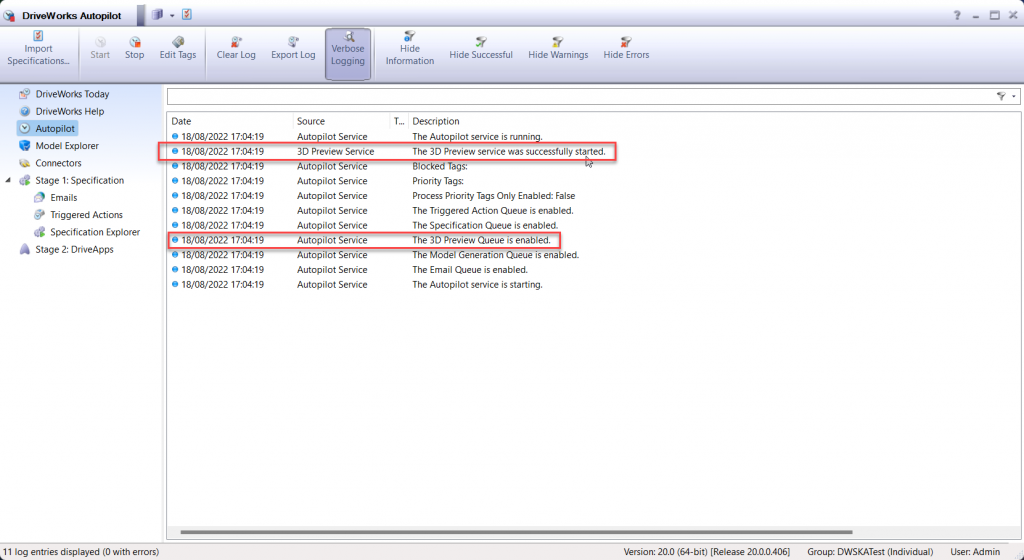
6 – Volte ao DriveWorks Autopilot e cliquei em Start (se já estava em Start, então cliente em Stop e Start novamente). Verifique se o 3D Preview Services será iniciado.
7 – Faça o seu primeiro teste e crie uma nova especificação e confira que o 3D Preview já vai ser gerado ao clicar em Preview. Porém essa visualização ainda não é dinâmica conforme mudamos os valores de dimensão.
Iremos adicionar a funcionalidade de dinamismo nos próximos passos.
Como já conhecemos, essa interface construída no Form Design do DriveWorks Administrator pode ser publicada no DriveWorks Live, ou seja, em um navegador web e até no navegador web de um smartphone.
8 – Após ter feito alguns testes na etapa anterior, observem na tela do DriveWorks Autopilot em seu log, podemos ver que um arquivo .DRIVE3D foi gerado. Esse arquivo .DRIVE3D é o gerador da visualização.
Importante: O nome do arquivo .DRIVE3D recebe o mesmo nome da peça ou montagem principal controlada pelo DriveWorks.
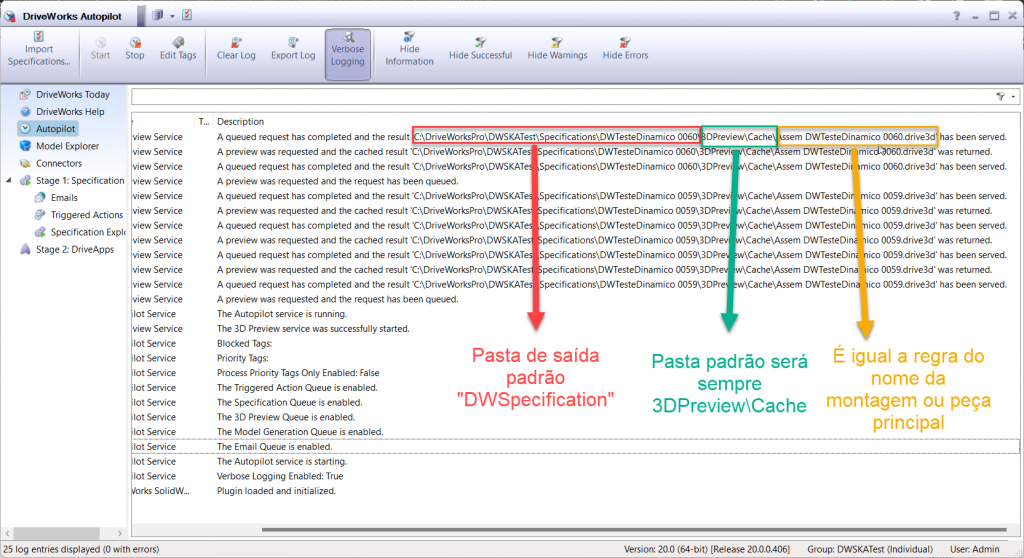
9 – Precisamos fazer com que o nome do arquivo .DRIVE3D mude de nome e seja criado dinamicamente para a geração da visualização, para isso, criaremos macros, variáveis e constantes.
10 – Crie uma variável em Define Variables com o nome NomeComponente e adicione controles de características como Comprimento e Largura.
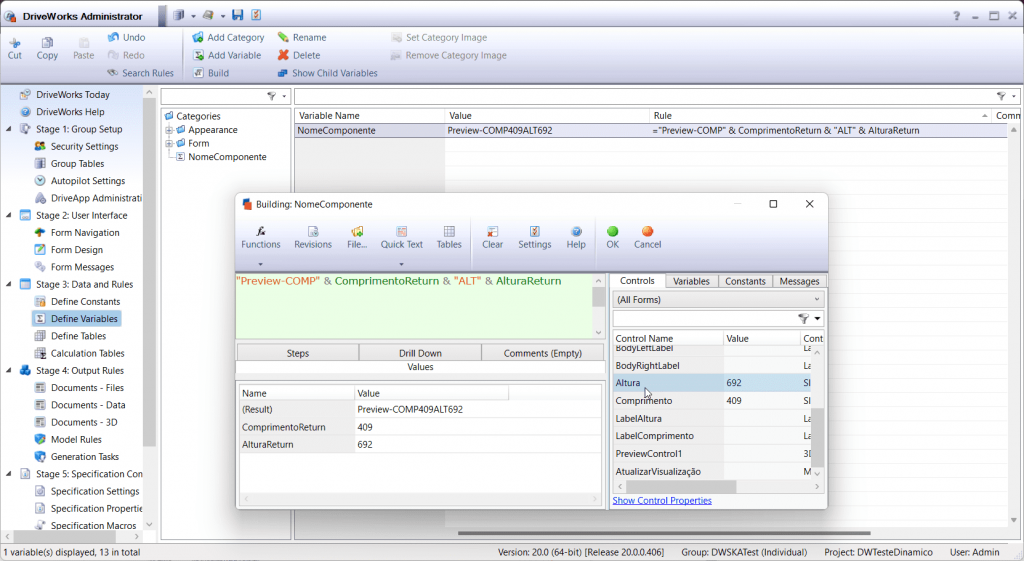
11 – Crie outra variável adicionando regra para o caminho completo de onde o arquivo .DRIVE3D será gerado incluindo a extensão. E use a virável criada anteriormente para o nome.
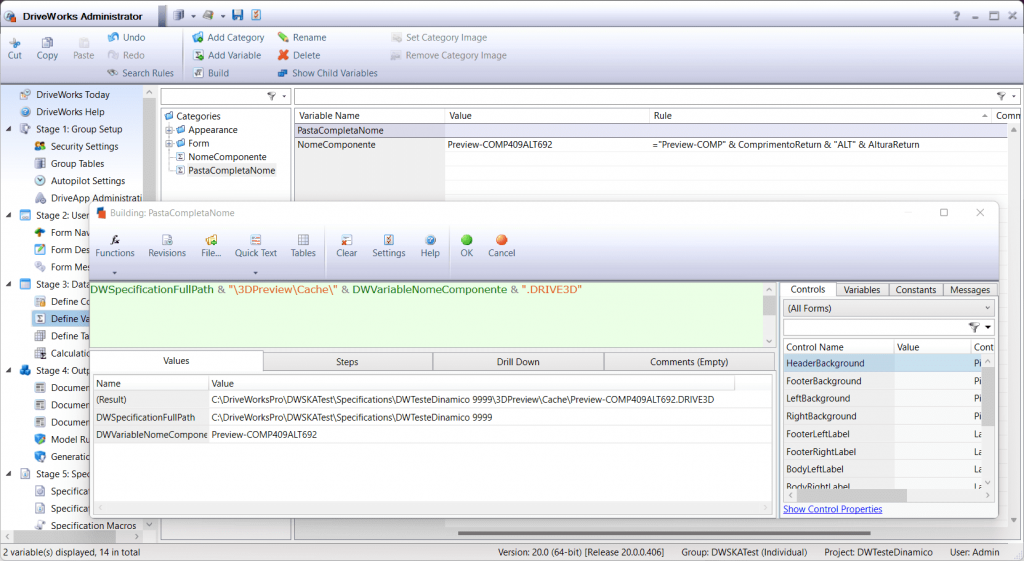
12 – Vá até o Model Rules e altere a regra do nome do arquivo de peça ou montagem principal usando a primeira variável que criamos a NomeComponente.
OBS: Use o “*” para remover o nome original do arquivo.
13 – A cada vez que clicarmos no botão de Atualizar Visualização, precisaremos também atualizar o caminho do novo nome do arquivo DRIVE3D que será gerado, então devemos criar uma constant.
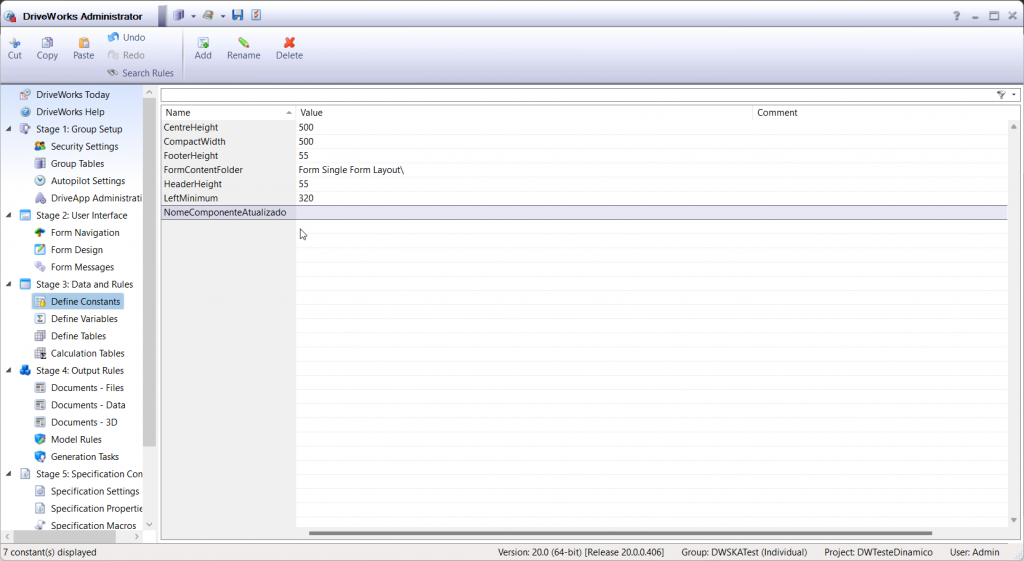
14 – Agora vamos criar as Specification Macros, a primeira macro será AtualizaVisualização que vai acionar a nossa 3D Preview Box.
15 – Crie a segunda macro para atualizar o caminho do arquivo .DRIVE3D, essa macro deve enviar a informação para a constante que criamos anteriormente com o nome de AtualizaCaminho.
16 – Voltando ao Form Design para adicionar as macros, variáveis e constantes.
Nas propriedades ajuste:
Macro Button (Atualizar Visualização) = Em Macro Name adicionar o nome da macro “AtualizaVisualização”.
3D Preview Box (PreviewControl1) = Em On Preview Complete Macro adicionar a macro de nome “AtualizaCaminho”.
3D Preview Box (PreviewControl1) = Em File Name adicionar a constante de nome “NomeComponenteAtualizado”
17 – Testando Projeto pronto com 3D Preview.
Recomendações finais:
O recurso de 3D Preview usa o SOLIDWORKS em background para a geração dos arquivos DRIVE3D para obtermos uma visualização fiel ao arquivo de projeto original.
Montagens em SOLIDWORKS com vários componentes pode fazer com que a geração da visualização seja lenta. Recomenda-se usar arquivos de SOLIDWORKS leves e com menor número de componentes possível.
Com o fluxo do DriveWorks você pode criar no Specification Flow um primeiro estado onde a pré-visualização seja gerada em arquivos de SOLIDWORKS simplificados. E ao avançar no Specification Flow os arquivos completos sejam gerados. Você pode tornar essa alternativa imperceptível aos usuários melhorando sua experiencia.
Quer saber como este e outros recursos desta solução podem fazer a diferença para a sua empresa? Entre em contato com a SKA pelo e-mail [email protected] e vamos conversar!